
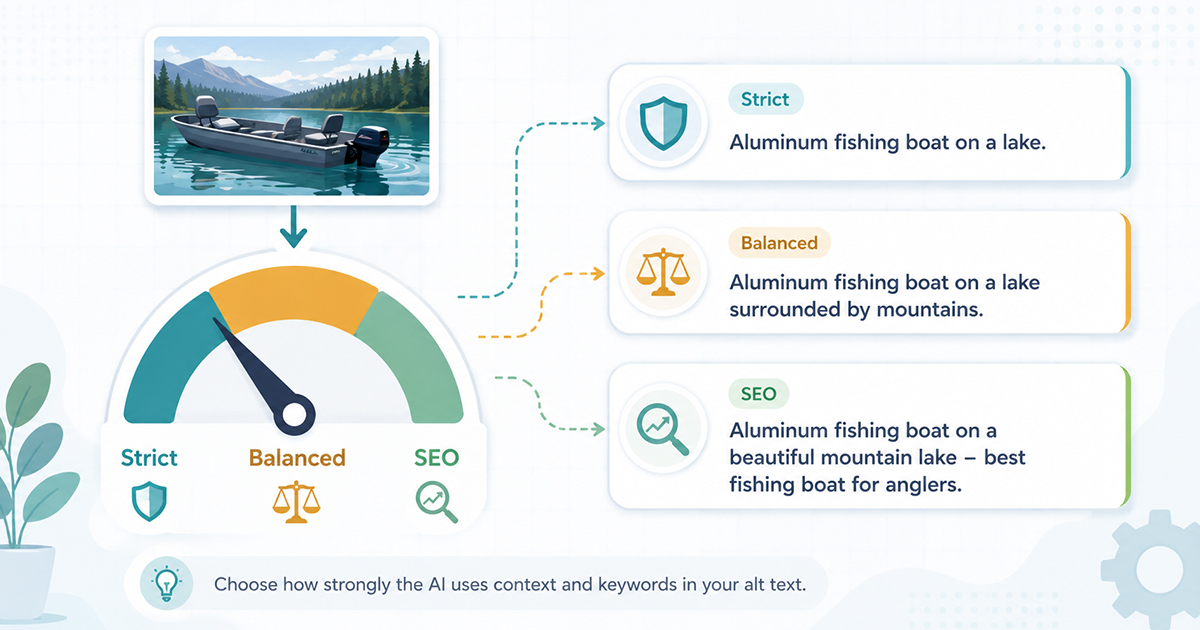
When you let AI write your image alt text, there is a quiet tension underneath it. Alt text has two jobs. It describes an image for people who cannot see it, and it gives search engines a text signal about what the image contains. Most of the time those jobs point the same direction. Sometimes they pull apart.
Say you send the AI a photo along with the context that it was taken at a specific venue, but the venue name is nowhere visible in the picture. Should the AI include the venue name because it is genuinely useful for search? Or should it leave the name out because it cannot actually see it in the image?
There is no single right answer. It depends on your site and your goals. That is exactly why Image Alt Text Pro lets you choose, with three levels of alt text context strength. This setting sits alongside the image context feature, which decides what information the AI receives in the first place, context strength decides how boldly it uses it.
The three levels of context strength
Strict – The AI uses your context only when it can confirm it in the image. If you send a filename or post title, the AI will lean on it only where the picture backs it up. It will not name things it cannot see. This produces the most literal, defensible alt text. If accessibility accuracy is your priority, this is your setting.
Balanced – The AI incorporates your context where it is plausible and does not contradict what is visible. It is a middle ground. It will work your keywords in when they fit naturally, without forcing them onto images where they clearly do not belong.
SEO – The AI actively weaves your context and keywords into the alt text for search relevance, even when they are not something it can visually confirm. This is the setting for the venue-name situation above. If your main goal is that the location, product, or brand term appears in the alt text for search, SEO leans hardest in that direction.
Only one sentence of instruction changes between these levels. The rest of how the AI works stays the same. You are simply telling it how much freedom it has to use context it cannot verify with its own eyes.
Which one should you pick?
Start with what you care about most:
- Accessibility first, factual to a fault: Strict.
- A sensible middle for a general blog or mixed library: Balanced.
- You specifically need location or product keywords in the alt text for search:SEO.
For most portfolio and catalog owners who turned on image context precisely to get their venue or product names into alt text, SEO is the natural choice. For a news or editorial site where the image must be described exactly as shown, Strict is safer.
An important note if you use Claude as your AI provider
Here is something worth knowing before you set everything to SEO. The AI providers do not all behave the same way.
If your provider is Claude, its own safety behavior can push back on the SEO level. Claude is cautious about anything that looks like keyword stuffing in alt text, and it may decline to force keywords in the way SEO mode asks for. One of our customers ran into exactly this: SEO mode triggered a Claude guardrail, and the output was not what they expected.
The fix was simple. They switched to Strict, and combined it with a strong, detailed prompt that told the AI to use the location from the context it was given. That got the location into the alt text reliably, without tripping the guardrail. Their words afterward were that the plugin then did exactly what they needed.
So the practical guidance is:
- Using Claude: start with Strict. If you need specific keywords in, put that instruction into your own prompt rather than relying on SEO mode. Strict plus a good prompt is the dependable combination here.
- Using OpenAI or Gemini: SEO mode works well and is the straightforward way to push keywords into your alt text.
This is not a shortcoming of any one provider. It is just a reminder that these models each have their own personality, and the best setting depends partly on which one you are using.
When a keyword absolutely must appear
If there is a keyword that has to be in the alt text no matter what, for example a person’s name that the AI will never be able to confirm from a photo, context strength alone may not guarantee it. For those cases there is a separate “guarantee keywords” option that adds the required term after the AI has written its description. Use it sparingly, because forced keywords can read a little less naturally, but it is there when a term is non-negotiable. If your goal is simply to attach a fixed brand or category to every image, prefixes and postfixes are often the tidier tool.