
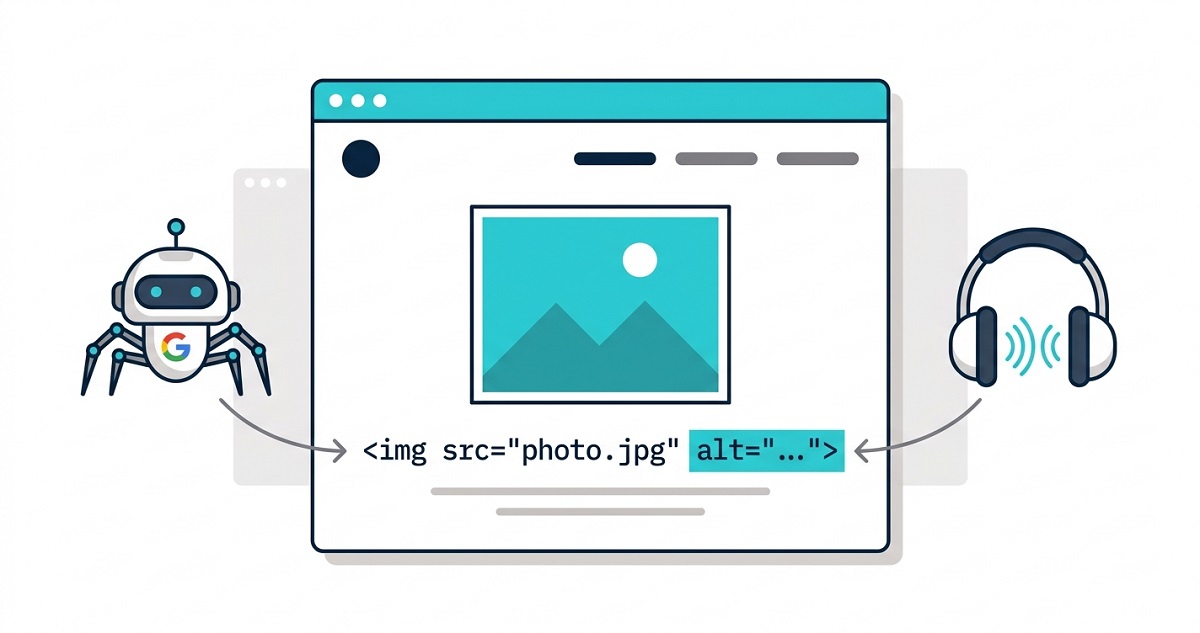
Every image on your website has a hidden text field. Most site owners ignore it. Search engines and screen readers cannot. Image alt text – short for alternative text – is the written description attached to an image in your HTML. It tells Google what your image shows, gives screen readers something to announce to visually impaired users, and appears in place of a broken image when a page fails to load. Get it right and it quietly improves your rankings, your accessibility score, and your user experience all at once. Get it wrong – or skip it entirely – and you leave a significant amount of SEO value on the table.
This guide covers everything you need to know: what image alt text is, why it matters, and exactly how to write it.
What is image alt text?
Image alt text is an HTML attribute added to an <img> tag that describes the content of an image in words. In the source code, it looks like this:
<img src="golden-retriever-puppy.jpg" alt="Golden retriever puppy sitting on green grass in sunlight">
The alt attribute is the text inside the quotes. When a browser renders the page normally, users never see it – the image appears instead. But three groups of visitors rely on it heavily:
- Search engine crawlers – Googlebot cannot see images the way humans do. It reads the alt text to understand what an image shows and what it relates to on the page.
- Screen reader users – Assistive technology reads alt text aloud to blind and visually impaired users, giving them the same understanding of the image that sighted users get visually.
- Browsers with broken or disabled images – When an image fails to load, the alt text displays in its place so users still understand what was there.
Alt text is not the same as an image title, a caption, or a filename. Each serves a different purpose. If you want a deeper comparison, the alt text vs title text guide breaks down exactly when to use each.
Why image alt text matters
For SEO
Google has confirmed that image alt text is one of the primary signals it uses to understand and rank images in Google Images. When your image carries a descriptive alt attribute, Google can:
- Index the image for relevant search queries
- Use the image as a ranking signal for the surrounding page content
- Surface your images in Google Images search results, which drives additional organic traffic
A page about home office furniture with images carrying no alt text is invisible to Google Images. The same page with descriptive alt text – "solid oak standing desk with cable management tray, home office setup" – can rank for those exact phrases.
The SEO impact extends beyond image search. Alt text contributes to the overall topical relevance of a page. A 2025 alt text SEO case study documented a 38% increase in organic traffic from a single site-wide alt text audit – no new content, no new backlinks, just accurate image descriptions applied to 214 previously unlabelled images.
For accessibility
WCAG 2.1 Success Criterion 1.1.1 requires all non-decorative images to have a text alternative. This is a legal baseline in many jurisdictions, including the United States under the ADA and the EU under the European Accessibility Act.
Beyond legal compliance, alt text is the only mechanism by which screen readers communicate image content to visually impaired users. Without it, a screen reader either announces the image filename ("IMG_4521.jpg") or skips the image silently. Neither gives the user the information they need. For a fuller breakdown of the accessibility impact, the guide on how image alt text improves accessibility covers all seven ways it affects the experience for screen reader users.
As a fallback when images fail to load
On slow connections, in low-bandwidth environments, or when a CDN fails, images sometimes do not render. In those cases, the browser displays the alt text in place of the image. A well-written alt text keeps the page readable and communicates the missing content. A blank alt attribute leaves a broken box.
How search engines use image alt text
Search engines treat alt text as content. When Google crawls a page, it processes the alt attribute the same way it processes the words in your headings and body copy – it reads it, indexes it, and uses it to understand the page’s topic.
This means alt text has a direct relationship with keyword relevance. An e-commerce page selling running shoes with images labelled alt="running shoes" is less competitive than one using alt="lightweight trail running shoes for women, size 7-12". The second description is richer, more specific, and matches more of the long-tail queries real buyers use.
Two important things Google does not do:
- It does not penalise missing alt text directly – but it ignores the image entirely, losing all the ranking opportunity it could have contributed.
- It does penalise keyword stuffing – filling alt text with comma-separated keywords (
alt="shoes, running shoes, best running shoes, buy running shoes") is over-optimisation and can hurt rankings.
For the full list of alt text mistakes to avoid – including keyword stuffing, duplicate descriptions, and generic filenames – see the dedicated guide.
The standard: describe what the image actually shows, naturally, with the words a real person would use to search for that image.
How to write image alt text — the right way
Describe what the image shows
Write what is in the image, not what you want it to rank for. If the image shows a barista pouring latte art into a white ceramic cup, that is what the alt text should say. alt="barista pouring latte art into white ceramic cup on wooden café counter"
If a keyword fits naturally because it accurately describes the image – use it. If you are forcing it in because you want to rank for it – do not.
Keep it concise
Alt text does not need to be a full sentence. Eight to twelve words is the standard for most images. Screen readers truncate at around 125 characters, so anything longer risks being cut off. Focus on the most important descriptive elements: subject, context, key details.
Include the page keyword only when it fits naturally
If your page is about oak dining tables and the image shows an oak dining table, including the phrase oak dining table in the alt text is accurate and appropriate. The alt text earns its keyword inclusion because it is genuinely describing the image.
Never start with “image of” or “photo of”
Screen readers already announce the element type — users hear “image” before the alt text begins. Starting your description with "image of..." is redundant and wastes the first characters of your description.
Use empty alt for decorative images
Not every image needs descriptive alt text. Purely decorative images – divider lines, background textures, abstract visual flourishes that carry no meaning – should use an explicitly empty alt attribute:
<img src="background-texture.jpg" alt="">
This tells screen readers to skip the image entirely rather than announcing a filename. Assigning alt="" is an active, intentional choice – not the same as leaving the attribute out, which causes unpredictable screen reader behaviour.
Image alt text examples — good vs bad
| Image | Bad alt text | Good alt text |
|---|---|---|
| Product photo of a blue backpack | "backpack" |
"navy blue hiking backpack with laptop compartment, 30 litre capacity" |
| Bar chart in a blog post | "chart" |
"bar chart showing 38% increase in organic traffic after alt text audit" |
| Team photo on an About page | "team" |
"Image Alt Text Pro team of four seated around a desk in a bright office" |
| A decorative wavy divider line | "divider" |
alt="" (empty — it is decorative) |
| A buy now button image | "button" |
"Buy Image Alt Text Pro — Start Free Trial" |
The linked image example deserves special attention. When an image is wrapped in a link, the alt text becomes the link label. A blank or missing alt text on a linked image means the screen reader announces "link, image" – giving the user no indication of where the link goes.
For e-commerce sites, alt text for product images follows additional rules – each product variant and gallery image needs unique, descriptive alt text to rank in Google Shopping and Image Search.
Image alt text in WordPress
WordPress stores alt text per image in the Media Library. It can be set in three places:
- Media Library – select any image, enter the alt text in the right panel under “Alt Text”
- Block Editor – click an image block and use the Alt Text field in the sidebar
- Page builders – Bricks, Elementor, and others have dedicated alt text fields per image element
One important distinction: alt text set in the Media Library is the default for that image. When the image is inserted into a post or page, the alt text carries over – but it can be overridden per placement. If you use the same image in different contexts, you may want different alt text each time.
For sites with hundreds of existing images, setting alt text one by one is not practical. Image Alt Text Pro generates accurate, contextual alt text for every image in your WordPress media library using AI – including images uploaded years before you set up any alt text workflow. The bulk processing feature handles your entire library in one run.
To understand how the AI generation process works before you start, read the guide on how to generate alt text automatically with AI.
The free Image Alt Text plugin on WordPress.org identifies every image with missing or empty alt text at no cost – a useful first step before deciding how to fix it.