
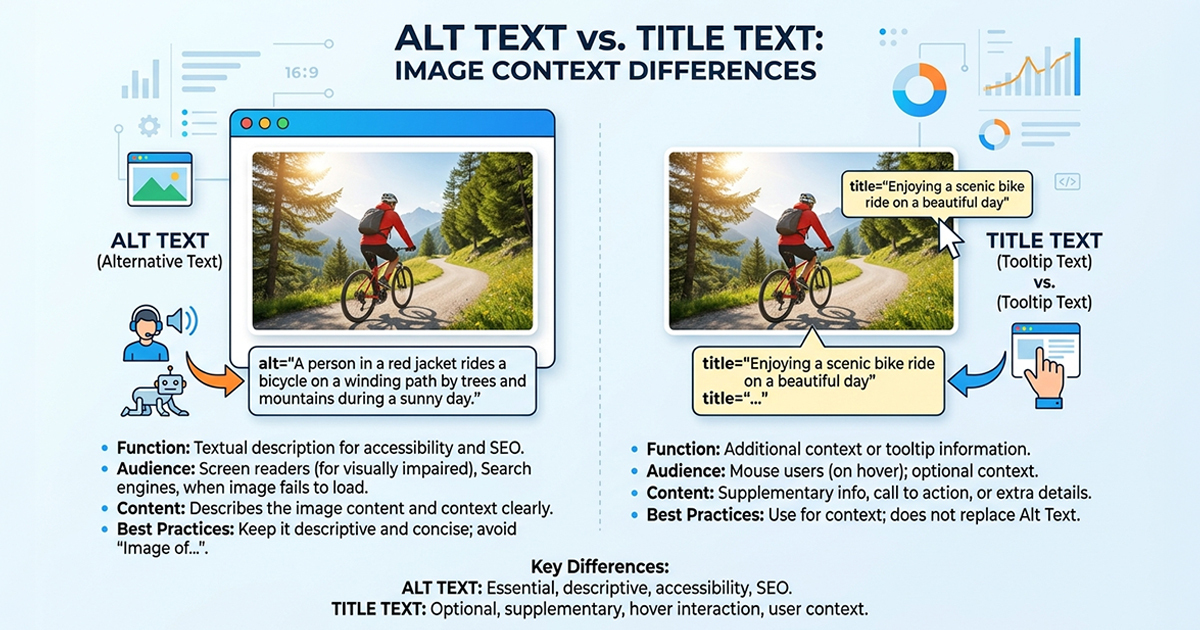
Every time you upload an image to WordPress, two fields sit side by side in the media editor: Alt text (alternative text) and Title Text. Most users fill them in with the same phrase – or skip both entirely. Understanding the difference between alt text vs title text is one of the most overlooked image SEO fixes on WordPress sites, and getting it wrong is costing you rankings.
This guide explains exactly what each field does, the five key differences between them, and which one Google actually uses to rank your images.
What is image alt text?
Alt text (alternative text) is a written description of an image stored in the HTML alt attribute:
<img src="wordpress-dashboard.jpg" alt="WordPress media library showing missing alt text fields">
It serves three purposes:
1. SEO – Google cannot see images. It reads the alt text to understand what an image shows and uses that to index it in Google Image Search. A well-written alt text is one of the highest-ROI on-page SEO actions you can take.
2. Accessibility – Screen readers read alt text aloud to visually impaired users. Without it, those users receive zero information about the image. The Web Content Accessibility Guidelines (WCAG 2.1) require all meaningful images to have descriptive alt text — it’s not optional.
3. Fallback text – If an image fails to load, the browser displays the alt text in its place, preserving context for the reader.
How to write it: Use this formula – Describe the image → Add relevant context → Include keyword if it fits naturally. Ask yourself: “If this image did not load, what would the reader need to know?” That answer is your alt text.
| Example | Type |
|---|---|
alt text seo image plugin |
❌ Keyword stuffing |
image |
❌ Too vague |
WordPress media library with empty alt text fields highlighted |
✅ Correct |
AI-generated alt text suggestion in Image Alt Text Pro |
✅ Correct |
What is image title text?
Image title text is an optional HTML attribute that shows as a tooltip when a user hovers their mouse over an image on desktop:
<img src="wordpress-dashboard.jpg" title="WordPress alt text guide">
Here is what most WordPress users do not know: image title text has no confirmed SEO value. Google has publicly stated it does not use the title attribute as a ranking signal. It does not affect how your images rank in Google Search or Google Image Search.
On mobile – where the majority of web traffic now comes from – title text is completely invisible. Hover states do not work on touchscreens.
Title text is a minor UX enhancement for desktop users only, and even then, most users never notice it.
Alt text vs title text – 5 critical differences
The core of the alt text vs title text debate comes down to five areas:
| Alt Text | Title Text | |
|---|---|---|
| Google ranking signal | ✅ Yes | ❌ No |
| Accessibility requirement | ✅ Yes (WCAG) | ❌ No |
| Screen reader support | ✅ Consistent | ⚠️ Inconsistent |
| Visible on mobile | ✅ (if image fails) | ❌ Not visible |
| SEO priority | High | None |
The short version: Alt text and title text are not interchangeable. One moves the needle on SEO and accessibility. The other is a hover tooltip that most of your visitors will never see.
Which one matters more for SEO?
Alt text wins – it is not even close.
Google’s official image SEO guidelines specifically call out alt text as a key signal for image understanding and ranking. Title text does not appear in their recommendations at all.
Well-written alt text can get your images ranking in Google Image Search – a traffic source many site owners overlook entirely. When an image ranks for a visual query, it drives clicks that your standard text pages may never capture.
From an accessibility standpoint, skipping alt text is not just an SEO miss. It is a compliance failure under WCAG – and increasingly, a legal risk for commercial websites.
If you can only focus on one: always alt text, every time.
How to add alt text in WordPress fast
Alt text can be added in three places in WordPress:
- Media Library – select any image, fill the Alt Text field in the right panel
- Block Editor – click an image block, use the Alt Text field in the sidebar
- Page builders (Bricks, Elementor) – each image element has a dedicated alt text input
The real problem for most sites is scale. If you have hundreds of images uploaded before you knew alt text mattered, writing them manually is hours of work.
Before scaling up, review the most common alt text mistakes so you know what good alt text looks like at every step.
That is exactly what Image Alt Text Pro solves – it auto-generates accurate, SEO-friendly alt text for every image in your media library using AI. You can bulk process your entire library in one click, including existing images that have never had alt text set.
Want to start free? The Image Alt Text plugin on WordPress.org lets you audit your site for missing alt text at no cost.
Alt text vs title text – final verdict
- Alt text – SEO signal, accessibility requirement, fallback text. Set it on every meaningful image, no exceptions.
- Title text – Desktop hover tooltip, no SEO value, invisible on mobile. Optional; skip it if you have limited time.
If your current workflow treats alt text vs title text as the same thing, fix that first. It is one of the simplest, highest-impact SEO improvements you can make to an image-heavy WordPress site – and you can automate the entire process.